
Farlight 84 Sens Converter – Complete Easy Guide for Beginners
Description
When you play shooting games, your aim is very important. If your sensitivity is wrong, you may miss easy shots. That is why many players use a Farlight 84 Sens Converter to fix their settings. This tool helps you match your sensitivity from other games so your aim feels smooth and natural.
For example, if you are coming from another shooter game, your muscle memory is already trained. But when you switch to Farlight 84, your aim may feel strange. This is where the converter becomes helpful. It adjusts your settings so everything feels familiar again.
In simple words, it saves your time and helps you play better faster. So, if you want better control and smoother gameplay, learning this tool is a smart choice.
What is Sensitivity in Farlight 84?
Sensitivity is how fast your camera or aim moves when you touch your screen or move your mouse. If your sensitivity is high, your aim moves very fast. If it is low, your aim moves slowly.
In Farlight 84, sensitivity controls how you look around, aim at enemies, and track moving targets. For example, high sensitivity helps in quick turns, but it can make aiming harder. On the other hand, low sensitivity gives better control but slower movement.
So, you need a balance. Good sensitivity helps you aim smoothly without overshooting your target. Every player has a different style, so there is no one perfect setting.
That is why tools like a Farlight 84 sens converter are useful. They help you find settings that match your comfort level. When your sensitivity feels right, your aim improves naturally and you win more fights.
Why You Need a Sens Converter Tool
Switching between games can confuse your aim. Each game has different sensitivity settings. Without help, it takes a long time to adjust.
A sens converter solves this problem. It quickly changes your old settings into new ones for Farlight 84. This means you do not need to guess or test again and again.
Using a Farlight 84 sens converter saves time and effort. It also keeps your muscle memory strong. As a result, you can focus on playing instead of fixing settings.
How Sensitivity Affects Your Aim and Gameplay
Sensitivity directly changes how you play the game. If your sensitivity is too high, your aim may shake and miss targets. If it is too low, you may not react fast enough.
Good sensitivity helps you:
- Track enemies smoothly
- Control recoil easily
- Aim with better accuracy
For example, when an enemy is running, balanced sensitivity helps you follow them without losing control. This improves your chances of winning fights.
That is why many players use a Farlight 84 sens converter. It helps them find a comfortable setting faster. With the right sensitivity, your gameplay becomes smoother, and you feel more confident during matches.
Farlight 84 Sens Converter Explained (Step-by-Step)
Using a sens converter is very simple. Just follow these steps:
- Open a trusted sens converter tool
- Select your old game
- Enter your current sensitivity
- Choose Farlight 84 as the target game
- Click convert
- Copy the new sensitivity settings
Now, open Farlight 84 and enter these new values in your settings.
The Farlight 84 Sens Converter works by matching movement speed between games. It makes sure your aim feels the same as before.
This is very helpful for players who switch games often. Instead of learning new sensitivity from the start, you keep your old aiming style.
As a result, you adjust faster and perform better in matches.
How to Convert Sensitivity from Other Games to Farlight 84
If you are coming from another shooting game, follow a simple method. First, note your current sensitivity settings. Then use a converter tool to translate those values into Farlight 84 settings.
After that, test your new sensitivity in training mode. Make small changes if needed. Every game feels slightly different, so a little adjustment is normal.
Using a Farlight 84 sens converter makes this process quick and easy. It gives you a strong starting point instead of guessing.
This way, you can enjoy the game faster without struggling with aim.
Best Sensitivity Settings for Beginners
If you are new, start with medium sensitivity. This gives you both control and speed.
Here is a simple setup:
- Camera sensitivity: Medium
- ADS sensitivity: Low to medium
- Scope sensitivity: Low
This setup helps you aim steadily without losing control. Beginners should avoid very high sensitivity because it makes aiming difficult.
Also, take time to practice in training mode. Slowly adjust your settings based on comfort.
Even if you use a converter, always test your settings. Your goal is to feel comfortable while aiming and moving.
Pro Player Sensitivity Settings in Farlight 84
Pro players usually use lower sensitivity for better accuracy. This helps them control recoil and hit precise shots.
However, some players prefer higher sensitivity for fast movements. It depends on their playstyle.
Most pros follow these ideas:
- Lower ADS sensitivity for accuracy
- Balanced camera movement
- Smooth tracking
They also spend hours practicing their settings. Even with a Farlight 84 Sens Converter, practice is very important.
So, instead of copying exactly, try their settings and adjust based on your comfort.
Mouse Sensitivity vs Mobile Sensitivity Differences
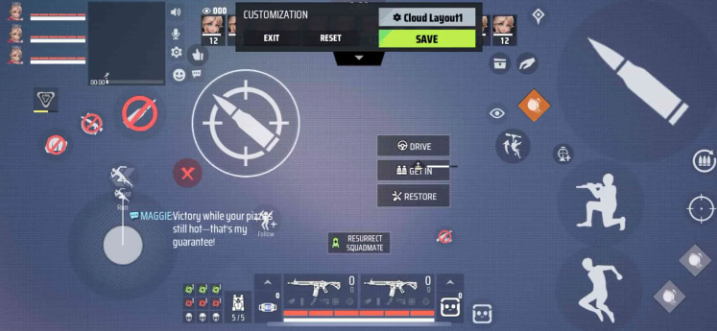
Mouse and mobile controls are very different. A mouse gives more precise movement, while mobile uses touch controls.
Mouse sensitivity depends on DPI and hand movement. Mobile sensitivity depends on finger speed and screen size.
Because of this, you cannot directly copy settings between them. You need to adjust carefully.
A converter can help, but manual testing is still needed. Always check how your aim feels after changing settings.
Understanding this difference helps you improve faster on your preferred platform.
DPI, ADS, and Gyroscope Settings Explained
DPI controls how fast your mouse moves. Higher DPI means faster movement.
ADS sensitivity controls aiming when you zoom in. Lower ADS gives better accuracy.
Gyroscope is used in mobile devices. It lets you aim by moving your phone.
For beginners:
- Use medium DPI
- Keep ADS lower than camera sensitivity
- Turn on gyro only if comfortable
These settings work together to improve your aim. Always test and adjust slowly for better results.
Common Mistakes When Using Sens Converter
Many players make simple mistakes while using converters:
- Not testing settings after conversion
- Using very high sensitivity
- Copying pro settings without practice
- Changing settings too often
A Farlight 84 sens converter gives a starting point, not a perfect result. You must still adjust based on your comfort.
Avoid changing settings every match. This confuses your muscle memory.
Instead, stick to one setup and practice regularly. Over time, your aim will improve naturally.
How to Find Your Perfect Sensitivity
Finding the perfect sensitivity takes time. Start with medium settings and test in practice mode.
Try tracking moving targets. If your aim feels too fast, lower it. If it feels slow, increase it slightly.
Make small changes step by step. Do not rush the process.
Also, play real matches to see how your aim performs under pressure.
Your perfect sensitivity is the one that feels smooth and comfortable. Once you find it, avoid changing it often.
Tips to Improve Aim After Sens Conversion
After using a converter, you still need practice.
Here are some easy tips:
- Play training mode daily
- Focus on tracking enemies
- Practice recoil control
- Keep your crosshair at head level
Do not expect instant results. Improvement takes time.
Stay consistent with your settings and practice regularly. Slowly, your aim will become more accurate and stable.
Recommended Tools and Websites for Sens Conversion
There are many online tools for sensitivity conversion. Look for simple and trusted websites.
Good tools should:
- Support multiple games
- Give accurate results
- Be easy to use
You can search online for sens converter tools and test a few options.
Always double-check your settings after conversion. No tool is perfect, so small adjustments are normal.
Using the right tool can save time and help you start with better settings quickly.
Final Thoughts on Farlight 84 Sens Converter (150 words)
The Farlight 84 Sens Converter is a very helpful tool for players who want better aim. It makes switching from other games easy and smooth. Instead of guessing your sensitivity, you get a strong starting point. This saves time and improves your gameplay faster. However, remember that no tool is perfect. You still need to practice and adjust settings based on your comfort.
Good sensitivity helps you aim better, react faster, and win more fights. So take your time, test your settings, and stay consistent. In the end, your skill improves with practice, not just settings. Use the converter wisely and enjoy the game.
It is a tool that helps you change sensitivity from other games into Farlight 84 settings.
It gives a close result, but you may still need small adjustments.
Yes, it is very easy and helpful for beginners.
There is no single best setting. It depends on your comfort and playstyle
You can try it, but always adjust it to fit your own comfort.
With daily practice, you can see improvement in a few days or weeks.
It is helpful, but you can also adjust settings manually.